
Payment Method
You can add, edit, or remove your direct deposit information via your Dashboard. All payments are deposited directly to your bank account.
Net-7 Day Pay Cycle (Default)
To support quality reviews and provide a smooth experience for inspectors and customers, Inspectify issues payments on a Net-7 schedule by default.
- Payment Trigger: Payment is initiated 7 calendar days after your inspection report is published.
- Automatic Processing: Once the 7-day review window closes, payment is initiated automatically — no action required.
- Deposit Timing: Funds typically arrive within 1–3 business days, depending on your bank.
Each inspection is paid independently, based on the completion date of that specific report. You may be paid separately for multiple services completed for the same property. View your upcoming payments on the Payment History section of your Dashboard.
Fast Pay (Optional)
If you prefer to receive payment sooner, Inspectify offers an Fast Pay option.
With Fast Pay enabled, payment is initiated immediately after your inspection report is published, rather than waiting for the 7-day review period.
- Fee: $2.99 per inspection.
- Timing: Payment is initiated right after report publication.
- Deposit Timing: Funds typically arrive within 1–3 business days, depending on your bank.
- Per-Job Fee: The $2.99 fee is applied once per job, even if it includes multiple services (for example, a home inspection and floor plan).
Fast Pay is completely optional. If you do nothing, your payments will continue on the Net-7 schedule.
Here is a screenshot of what that looks like on your Dashboard: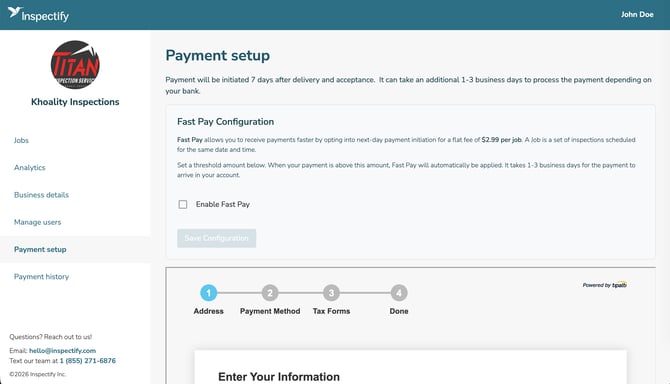
Customizing Fast Pay
You control how Fast Pay works for you from your Dashboard.
- You can enable or disable Fast Pay at any time
- You may set a minimum payout threshold, so smaller-paying jobs follow Net-7 with no fee
- Fast Pay settings are applied at the time your report is uploaded
Example: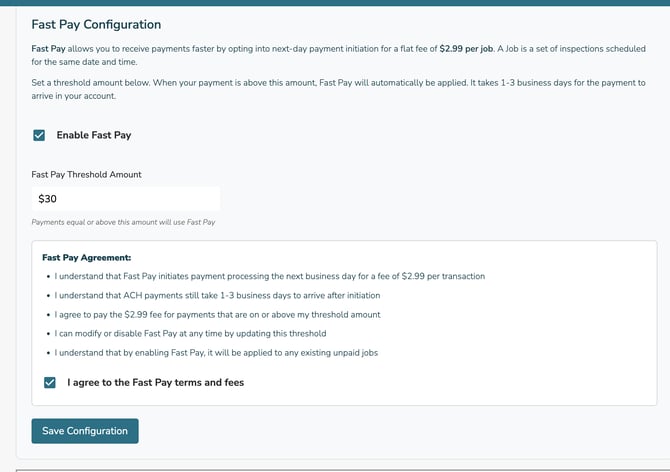
Note: Any changes made to Fast Pay will be automatically applied to all jobs in payment pending status unless they fall below the threshold set by the contractor
Automation & Invoicing
Inspectify payments are fully automated.
- No invoicing required
- Payments are triggered automatically based on your selected pay option
- You can view payment status in your Dashboard at any time