
Toolkit will auto populate a box when you select ”Subject-To” in Toolkit, as all AIV orders are to be completed AS-IS. AIV+ARV orders will not have this blocker.

.png?width=434&height=477&name=Screenshot%202026-02-05%20at%203.47.57%20AM%20(1).png)
You will have the option to click cancel and re-evaluate your choice of Subject-To or if it is appropriate to select AS-IS.
-
If you believe the Subject-To option is still the best choice, the box will repopulate when you select “subject-to”. Please enter your reasonings for selecting subject-to in this box.
.png?width=334&height=367&name=Screenshot%202026-02-05%20at%203.47.57%20AM%20(1).png)
The text typed into this box WILL be sent to the client and the Processing Team.
Once you are ready to send your notification, you will click escalate. Once the escalate button has been clicked, the report will lock and you will see this box:
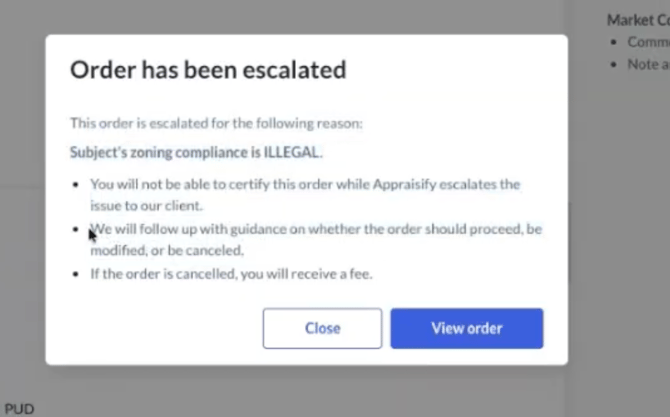
You will NOT be able to submit the order once it has been escalated until the Processing Team resumes the order.
The status will change in your Toolkit dashboard:

You can still open the file and review, but work will be limited until it comes out of the escalated status.
- Processing Team will receive a stop and call email, the file will automatically be placed “On Hold” in our system and the client will receive a stop and call email with your reasonings.
- Once the order has been approved to proceed, the Processing Team will release the report for you to continue working.
- You will receive an email from the Processing Team notifying you that the order is cleared to resume.
- Once the order has been approved to proceed, the Processing Team will release the report for you to continue working.