
Understanding your contractor score
Your contractor score is a number out of 100 that reflects how consistently the jobs you accept are completed and delivered on time, and how accurately and thoroughly your reports meet each job's requirements. It is calculated based on your activity since June 1, 2026 when we implemented the contractor score.
You can view your score in two places:
- Online dashboard → Analytics tab
- Inspectify app → Profile section
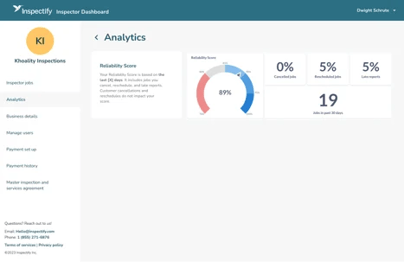
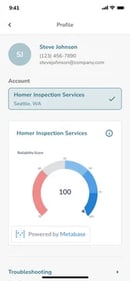
In addition to your score, the Analytics tab also shows:
- The total count of jobs completed since June 1, 2026.
- The proportion of those jobs that included a late report, self-initiated reschedule/cancellation, or a report quality issue.
- A list of issues currently impacting your score.
How your score is calculated
Your score measures your average issue impact per inspection. Each issue recorded on your inspections impacts your score. Fewer issues lead to a higher score.
- Issue weight: More severe issues carry higher weights based on how much they affect the client.
- Issues fade and expire: Older issues impact your score less over time. One year after an issue is recorded, it drops off your score.
- Start date: Only inspections and issues recorded on or after June 1, 2026 count toward this calculation.
- Grace period: The first time you receive feedback on a specific issue type, it doesn’t impact your score. You will still receive an email with tips on how to prevent it next time.
What counts toward your score
Your contractor score is affected by two categories of issues: scheduling & delivery and report quality.
Report quality
The report template included with the job lists what the client expects in the report. A report quality issue is recorded when the report doesn't meet the template requirements and there isn’t a limitation to explain why. The feedback email you receive explains which part of the template wasn’t documented properly or which requirement wasn’t met.
Using a limitation to explain why something couldn’t be documented is completely acceptable and will not count against your report, as long as two conditions are met:
- Provide a valid reason: Note the specific obstacle preventing access, such as:
- Safety hazards (e.g., loose wiring, unstable flooring)
- Physical barriers (e.g., locked gates, overgrown brush)
- Denied access (e.g., an occupant or worker refused entry)
- Keep it consistent: Make sure other parts of your report don't contradict your explanation (e.g., claiming an area was inaccessible due to severe rain when your photos show clear, sunny skies).
Report quality issues may include but are not limited to:
- Roof Inspection Method → The roof was not walked or drone-inspected, and no adequate limitation was added.
- Incomplete Documentation → Areas visible in the walkthrough video, floor plan, or elsewhere in the report are not documented.
- Instructions Not Followed → Template instructions, client-specific requirements, or Community Guidelines were not followed.
- Report Discrepancies → Contradictory information appears within the same report.
Scheduling & delivery
The appointment time and report delivery timing come from the details of the order, not from the template.
The following self-initiated actions impact your score:
- Late Report → A report published more than 24 hours after the appointment start time.
- Self-Initiated Reschedule → Any time you reschedule a confirmed job.
- Self-Initiated Cancellation → Any time you cancel a confirmed job.
- Late Arrival → Arriving 30+ minutes late to an applicable job.
Note: Customer-initiated cancellations and reschedules do not impact your score.
What you control
You decide which orders to accept.
- Review the order details before you accept it. If it includes a request you aren't willing or able to perform, you can decline it. Declining an offer never affects your score or the offers you receive.
You can use feedback for future inspections.
- When a report quality issue is recorded, you can read the feedback sent in email and use it however suits your business for later inspections.
You can appeal an issue you believe is inaccurate.
- Reply to the feedback email with any additional detail or context that may affect the outcome. If an appeal is upheld, the issue is removed and your score is recalculated.
You choose your own coverage and availability.
- There is no minimum number of orders you need to accept.
Why your score matters
Your score affects the order in which new offers are sent to contractors in your area. A higher score generally means you see offers earlier.
Because a high score reflects a low overall issue rate, it is also a good indicator of how satisfied clients are with the work delivered. We treat client feedback as an opportunity to help you understand what clients expect from the work.
Frequently asked questions
Does an issue stay on my score forever?
No. Each issue's effect fades over the year until it no longer counts.
My account has more than one user. Whose score is it?
The team's. For accounts with multiple users, the contractor score represents the entire team, combining the inspections and issues recorded across the account.
What if I couldn't complete something because of safety or access issues?
If you can't access the property or a significant portion of it, like the interior, use the in-app access issue workflow so Inspectify can coordinate with the client. If only one room or system is affected, note a clear limitation in the report. A documented limitation isn't an issue unless the rest of the report contradicts it. Not sure which applies while on site? Text the Customer Service team at (855) 271-6876.
Will declining an offer lower my score?
No. Declining an offer doesn't affect your score or the offers you receive.
How do I appeal an issue impacting my score?
If you believe something was flagged in error, reply to the feedback email with additional context or clarification.
What should I do if I am running late due to traffic, weather, or an unexpected delay? Contact us immediately by texting the Customer Service team at (855) 271-6876, providing the property address and details about the delay. Communicating unavoidable delays ahead of time ensures your score isn't unfairly impacted.
Who do I contact with questions? For general questions, email partnerships@inspectify.com. For on-site questions, text the Customer Service team at (855) 271-6876.